Overview
MealMate is an innovative meal planning app designed to alleviate the stress and challenges faced by busy families in planning, shopping for, and preparing meals. As a key member of the project team, I led UX research initiatives, spearheaded feature development, and created the majority of the app's core interface designs.
The Challenge
Our research revealed that busy parents struggle with:
- Orchestrating wholesome meals that meet specific dietary needs
- Finding time to plan meals, create shopping lists, and source recipes
- Balancing nutritional value with ingredient availability
- Managing daily meal-related stress
These challenges often result in unhealthy food choices, increased stress, and dissatisfaction with family mealtimes.
The Solution
MealMate addresses these challenges through:
- Personalized meal suggestions based on dietary preferences and restrictions
- Automated shopping list generation
- Easy-to-follow recipes with step-by-step instructions
- Ingredient substitution suggestions for flexibility
The app aims to simplify the entire process of planning, shopping for, and preparing meals for busy families.
My Role
As the lead UX designer, I was responsible for:
- Conducting and synthesizing user research
- Determining and prioritizing core features
- Creating the majority of the app's interface designs
- Collaborating with team members to ensure a cohesive user experience
The Process
1. Research
I led a comprehensive research phase to understand our users' needs:
- Distributed a survey to 15 busy families, gathering quantitative data on meal planning habits and pain points
- Analyzed existing meal planning apps to identify market gaps
- Collaborated with the team to create user personas and journey maps, guiding our design process
Key insights from our survey:


These findings directly informed our feature prioritization and overall app design.
User Personas
Based on our research, we developed two key personas to represent our primary user groups:


These personas helped guide our design decisions throughout the project, ensuring that MealMate addresses the specific needs and pain points of our target users.
2. Ideation
Based on our research and personas, I:
- Developed detailed wireframes to visualize key features and user flows
- Created a cohesive design language
- Conceptualized the app name "MealMate" to reflect its role as a helpful companion

.png)

3. Design
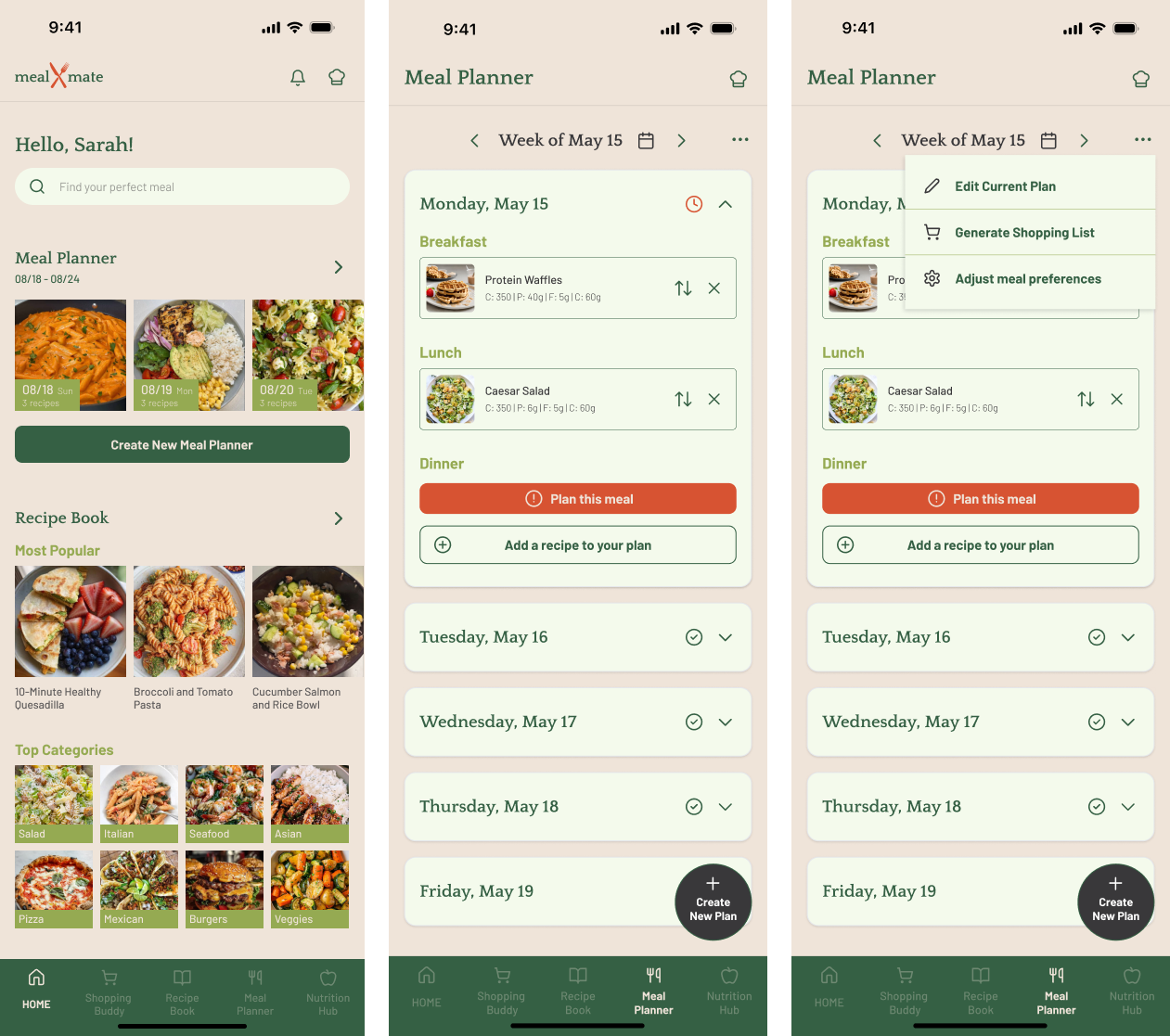
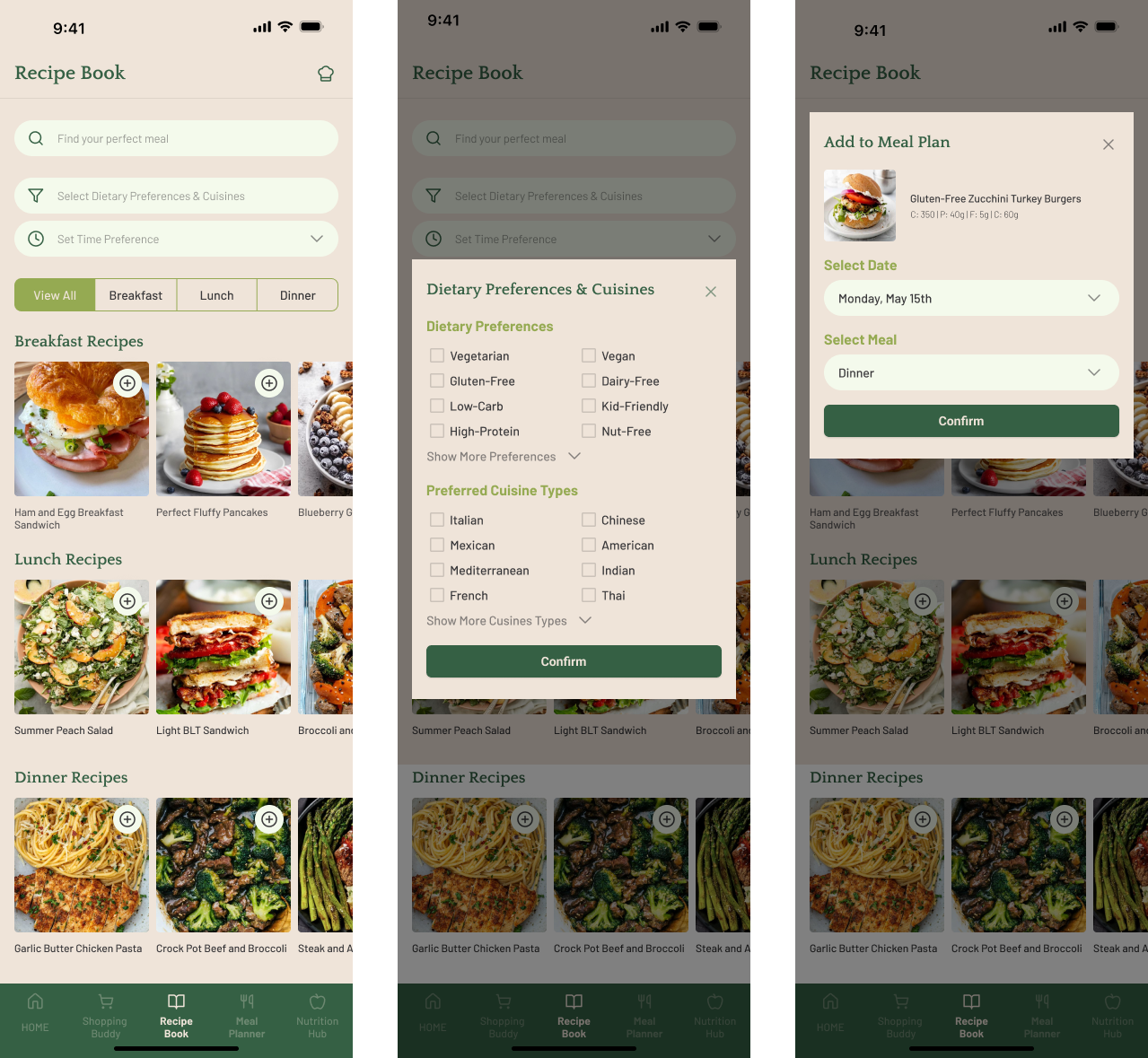
I took the lead in transforming our concepts into high-fidelity designs:
- Developed mockups using Figma, incorporating a carefully selected icon set
- Collaborated with team members to refine designs based on project goals and user needs
- Ensured visual consistency across all app screens
Key Features
- Personalized Meal Planner: AI-powered suggestions based on family preferences and nutritional needs
- Recipe Database: Extensive collection of easy-to-follow recipes with customization options
- Meal Prep Guide: Step-by-step instructions for efficient meal preparation
- Smart Shopping List: Automatically generated and optimized for efficient shopping
Outcome and Impact
The MealMate project resulted in:
- A comprehensive design concept addressing the needs of busy families
- Positive feedback from reviewers on the potential impact of the app concept
- A video demonstration that effectively communicates the app's proposed functionality and user experience
- Valuable experience in applying UI/UX design principles to a real-world problem
Lessons Learned
- User-Centric Design: Keeping the user at the center of every decision led to a more intuitive and potentially valuable product concept
- Cross-Functional Collaboration: Working closely with team members from different backgrounds enhanced the overall quality of our concept
- Visual Communication: The video demonstration proved to be an effective tool for conveying our design concept
- Balancing Ideation and Feasibility: Learning to balance innovative ideas with potential technical constraints was a valuable experience
Reflections and Next Steps
If developed further, potential next steps could include::
- Conducting user testing sessions with the prototype
- Exploring the technical feasibility of implementing the AI-powered meal suggestion feature
- Investigating potential partnerships with grocery stores or delivery services
- Developing a business model to understand the app's market viability
This project showcased my ability to lead UX research, drive feature conceptualization, and create intuitive UI designs that aim to solve real-world problems for users. It also highlighted the importance of team collaboration in bringing a complex app concept to life.

.png)
.png)

.png)